Alignment on both axes within CSS grid cells
It is possible to simultaneously set the alignment of elements within grid cells along both horizontal and vertical axes. For this purpose, we can combine two properties justify-items and align-items, which are set on the parent element.
At the center of the axes
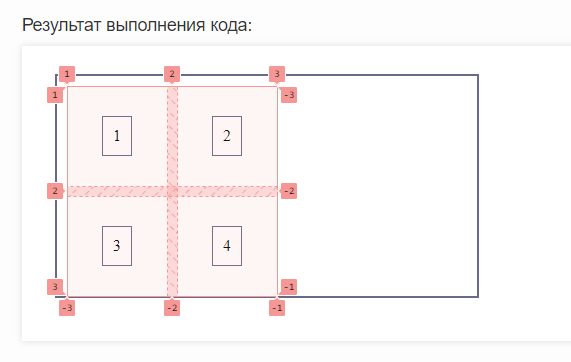
Let's align our elements to the center of the horizontal and vertical axes:
<div id="parent">
	<div>1</div>
	<div>2</div>
	<div>3</div>
	<div>4</div>
</div>
#parent {
	display: grid;
	justify-items: center;
	align-items: center;
	grid-template-columns: 100px 100px;
	grid-template-rows: 100px 100px;
	grid-gap: 10px;
	padding: 10px;
	border: 2px solid #696989;
	height: 200px;
	width: 400px;
}
#parent > div {
	grid-gap: 10px;
	padding: 10px;
	box-sizing: border-box;
	border: 1px solid #696989;
}
:
Now let's look at our grid in the debugger:
At the beginning of the horizontal and the end of the vertical
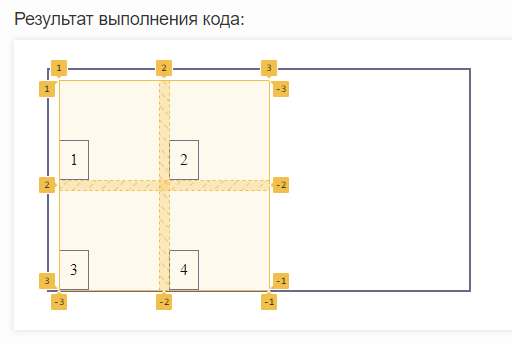
Let's arrange our elements in cells at the beginning of the horizontal axis and the end of the vertical axis:
<div id="parent">
	<div>1</div>
	<div>2</div>
	<div>3</div>
	<div>4</div>
</div>
#parent {
	display: grid;
	justify-items: start;
	align-items: end;
	grid-template-columns: 100px 100px;
	grid-template-rows: 100px 100px;
	grid-gap: 10px;
	padding: 10px;
	border: 2px solid #696989;
	height: 200px;
	width: 400px;
}
#parent > div {
	grid-gap: 10px;
	padding: 10px;
	box-sizing: border-box;
	border: 1px solid #696989;
}
:
Now let's look at our grid in the debugger:
At the end of the horizontal and the beginning of the vertical
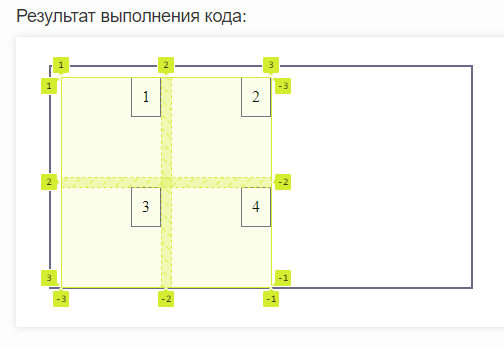
Let's arrange our elements in cells at the end of the horizontal axis and the beginning of the vertical axis:
<div id="parent">
	<div>1</div>
	<div>2</div>
	<div>3</div>
	<div>4</div>
</div>
#parent {
	display: grid;
	justify-items: end;
	align-items: start;
	grid-template-columns: 100px 100px;
	grid-template-rows: 100px 100px;
	grid-gap: 10px;
	padding: 10px;
	border: 2px solid #696989;
	height: 200px;
	width: 400px;
}
#parent > div {
	grid-gap: 10px;
	padding: 10px;
	box-sizing: border-box;
	border: 1px solid #696989;
}
:
Now let's look at our grid in the debugger:
Practical tasks
Create a grid of five elements arranged in three rows. Align the elements in the cells to the origin of the horizontal axis and the center of the vertical axis.
Now arrange the grid elements in two rows and set the alignment of the elements within the cells to the center of the horizontal axis and the origin of the vertical axis.
Modify the previous task so that the elements are aligned at the end of the horizontal axis and the center of the vertical axis.

